See it first. Then try it yourself.
Meet your free
Tap Card.
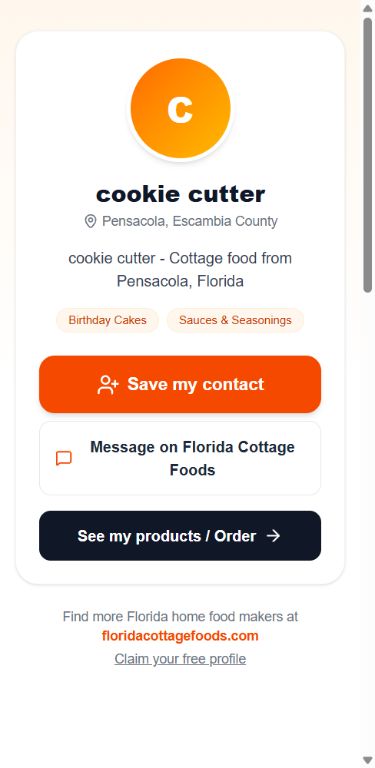
It is a simple page for your business. A customer scans your QR code, and this card opens on their phone.
They can save your business details, ask you a question, or see what you sell. Watch the short video below to see how.
Your card and QR code are free. Detailed analytics need a paid subscription. Printing paper cards may cost extra.
Start with this short video
What does the card do?
You do not need to set anything up to watch. This video uses Cookie Cutter’s real card to show what a customer sees.
Try the real example card (opens in a new tab)This example belongs to Cookie Cutter. Your card shows your own business details and the buttons you choose to share.
Sound on for the explanation. Captions are included.
Music: Life of Riley by Kevin MacLeod. CC BY 4.0. Excerpt mixed under narration.
What's a QR code?
It's a square picture your phone camera can read. Your customer points their camera at it, taps the link, and your digital card opens. They don't need a special app.
Tap Card is the name of your digital business card on Florida Cottage Foods.
Here is how it works
- You hand someone your printed card. Your QR code is the little square picture on it.
- They open their phone camera. They point it at the square, then tap the link that appears.
- Your Tap Card opens. They choose a button to save your business details, send you a message, or see your products.
You have two different cards: the paper card you hand out, and the page that opens on a phone. Your QR code connects the two.
Know what you are getting
Your card is free. Detailed reports are paid.
“Analytics” means the numbers that show how people use your card.
Your card and QR code
- Your digital Tap Card
- Your downloadable QR code
- Your printable table sign
- Two monthly totals: card views and contacts saved
Detailed Tap Card reports
- See whether visits came from a QR code, a tap sticker, or a shared link
- See a chart showing visits each day
- Review these details for the last 30 days
Just want a card customers can use? Stay on the free plan. You only need a paid subscription if you want the extra reports or other paid features.
Where do I find the numbers? Open My Tap Card and scroll down to Card activity. Your two monthly totals are free. To unlock the detailed reports, choose See the plans and subscribe to Seed, Sprout, or Bloom.
Start here
Save your QR code
- Sign in. Open your maker dashboard.
- Find the box called My Tap Card. Choose Tools in your dashboard, then look for the My Tap Card box. Choose the orange Open button inside that box.
- Check your card. Choose Preview to see what a customer sees. Come back when you are done.
- Save the square QR picture. Under Share your card, choose Save my QR code (best for printing).
What if a print shop asks for an SVG?
On My Tap Card, choose Save for a print shop (stays sharp at any size). That downloads the SVG version. Otherwise, the PNG is a simple place to start.
Keep it simple
Put that QR picture on a paper card
You only need three things: your business name, your QR code, and a line telling people to scan. A logo is optional.
Your business name
Add your logo if you have one. Underneath, say what you make.
“Sunrise Bakes”
“Small-batch cookies in Tampa”
Your QR code
Put it on a plain, light background. Add this short message:
“Scan to save my contact
& see my menu”
An easy way to design it in Canva
- Open Canva. Search for business card. Pick a simple design. Free templates and free pictures help you avoid paid features.
- Put your name on it. Select the sample business name and replace it with yours.
- Add your saved QR picture. Choose Uploads, then Upload files. Find the .png picture from step 1 and choose it.
- Place the picture on the card. Select the uploaded picture to add it. Leave white space around the square.
- Add a short message. Type “Scan to save my contact & see my menu” beside or below the square.
- Save your finished design. Choose Share, then Download. For a print shop, choose PDF Print and check the shop’s instructions before ordering.
Prefer a print shop or home printer?
Print shop: bring your business name, logo if you have one, and downloaded QR file. Ask them to help arrange the card and show you a sample before printing the full order.
At home: use business-card sheets that work with your printer. Match the template to the sheet's product number, and print a test on plain paper first.
Watch: Design your business card in Canva
By Canva · A beginner lesson on templates, text, color, and preparing a business card for print.
Open video: Design your business card in Canva
Watch: Upload an image to Canva
By Canva · Watch the uploading section to add your saved QR image. Keep the QR unchanged: do not crop it, add filters, or cover its dots.
Open video: Upload an image to Canva
These videos are by Canva, not Florida Cottage Foods. Some screens may look different as Canva updates. Use your downloaded Florida Cottage Foods QR code; you do not need another QR service.
Before you buy a stack
Test it. Then print it.
Print one sample at the size you plan to use. A code that works on your screen still needs a test on paper.
- Make the code easy to see. Start around 0.8 inch (2 cm) square or larger. The right size depends on the code and print quality; your paper test is what matters.
- Keep it dark on white. Leave the clear white border around the downloaded code. Don't put words, a logo, or a photo over the dots.
- Scan it with a phone camera. Tap the link that appears. It should open your Tap Card, not Cookie Cutter’s example card.
- Check what customers see. Try the menu and save-contact buttons. Check that your business details are correct.
Order a small batch first. Tuck a card into orders and keep a few on your market table.
Supplies to make your card
All optional — a phone and a local print shop work fine. But if you want to print cards at home or add a tap sticker, these help. (These are affiliate links; we may earn a small commission at no extra cost to you.)
Shop supplies
Avery Blank Business Cards 250-Pack
Printable cards with Sure Feed technology
$12.99White Cardstock, 110 lb
Heavyweight white paper for DIY cards and your printable table sign — inkjet & laser
From ~$10NTAG215 NFC Stickers
Program once so customers tap their phone to open your card — works with iPhone & Android
From ~$9Acrylic Sign Holders 30-Pack
Small 3.5" x 2" clear display stands
$16.99* These are affiliate links. We may earn a commission at no extra cost to you.
Watch and follow along
Video tutorials
These beginner tutorials from Canva help with designing your card and uploading images. Use the written steps above to download your Florida Cottage Foods QR code and test the finished card.
Need a hand?
I can't find my QR code.
Open My Tap Card while signed in. Your profile needs to be active before the public card and QR downloads work. If your card isn't live yet, follow the notice on that page or contact support.
My phone won't scan the printed card.
Try better lighting, flatten the card, and move your camera a little farther away. If it still won't scan, make the code larger, use the original downloaded file, and restore the white space around it. Print another sample before ordering.
Do customers need an account or app?
No special app is needed to scan the code or open your public Tap Card. Customers use their phone camera and tap the link. The details shown depend on what you choose to share in My Tap Card.
Will my home address be on the card?
Your Tap Card does not show your home street address. Review the sharing switches on My Tap Card to choose which contact details appear. A business card does not replace any required information on your food labels.
Give customers a way to find you again.
Start with your free QR code. One small step, one useful card.
Get my QR codeNew here? Create your free maker profile